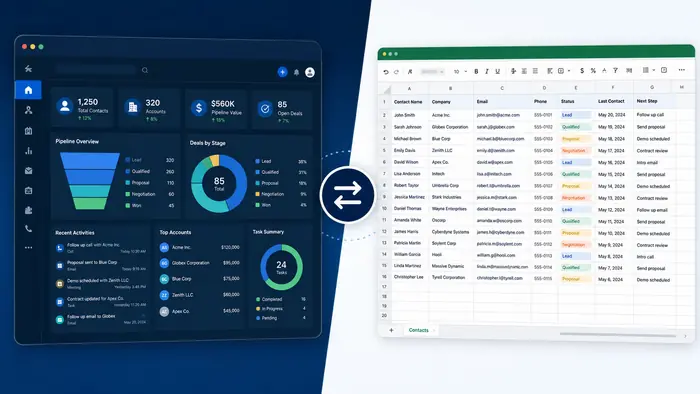
A spreadsheet can be a sensible way to begin tracking customers. It is familiar, flexible and inexpensive. As lead volume, team size and follow-up complexity grow, however, a CRM may provide stronger structure, automation and relationship history.
This comparison focuses on the decision criteria. For a wider platform-selection framework, read our CRM product comparison guide.
CRM vs Spreadsheet at a Glance
- Spreadsheet: flexible tables, manual updates and low initial cost
- CRM: structured customer records, pipelines, activity history and workflows
- Spreadsheet: useful for simple lists and analysis
- CRM: useful for repeatable sales and customer-management processes
Contact Records
A spreadsheet stores rows and columns effectively, but related conversations, tasks, files and company relationships can become difficult to manage. A CRM creates a record designed around customer activity and ownership.
Collaboration and Accountability
Shared spreadsheets allow multiple editors, but ownership and changes may be unclear. CRM permissions, tasks and activity history make it easier to see who is responsible and what happened.
Follow-Up and Automation
Spreadsheets generally depend on manual reminders or external scripts. CRMs can trigger assignments, confirmations, tasks and stage changes. See CRM With Automation for safe workflow design.
Reporting
Spreadsheets offer powerful formulas and analysis when the data is clean and the user is skilled. CRM dashboards make common pipeline and conversion reports easier to repeat, although advanced customization varies.
Security and Data Quality
Both tools require appropriate access controls. A CRM often provides role-based permissions, field structure, duplicate management and audit history. A poorly configured CRM can still contain inaccurate or excessive data.
Cost
A spreadsheet’s subscription cost may be low, but include employee time spent updating, checking and repairing data. CRM costs can include users, contacts, communication, AI, integrations, migration and administration.
When a Spreadsheet Is Enough
- One person manages a small number of contacts
- Follow-up is simple and infrequent
- No communication history or automation is required
- The list is used mainly for basic reference or analysis
- The business has a clear backup and access policy
Signs You Need a CRM
- Leads are missed or followed up inconsistently
- Several employees need the same customer history
- Sales stages and opportunity values must be tracked
- Appointments, messages or tasks need automation
- Managers need repeatable conversion reports
- Spreadsheet versions or permissions cause confusion
How to Migrate
Clean duplicates, standardize fields, define required consent data and map spreadsheet columns to CRM fields. Import a small test batch first. Validate owners, dates, notes and pipeline stages before moving the complete dataset.
Frequently Asked Questions
Is a spreadsheet a CRM?
A spreadsheet can perform basic contact tracking, but it lacks much of the structure, activity history, automation and governance typical of CRM software.
When should a small business move to a CRM?
Move when manual tracking creates missed follow-up, unclear ownership, unreliable reports or excessive administrative work.
Can I use a CRM and spreadsheet together?
Yes. The CRM can remain the system of record while spreadsheets support temporary analysis or controlled exports.
Is CRM always more secure than a spreadsheet?
No. Security depends on configuration, permissions, provider controls and user behavior. Evaluate the specific setup rather than the product category alone.